
Google Maps is a tool that people use to find their way. Make Your Business More Visible on Google Maps It also helps local businesses get customers. If your business shows up when people search for things in your area you might get calls visits to your website and even people walking into your store. On the hand if your business is hard to find on Google Maps people might choose to go to your competitors instead. The good news is that you do not have to spend a lot of money on advertising to make your business more visible. By making your Google Business Profile better being relevant to your area getting reviews and keeping your business information up to date you can make a difference in how people find your Google Business Profile. In this guide we will look at ways to make your business more visible on Google Maps.
What Is Google Maps Visibility?
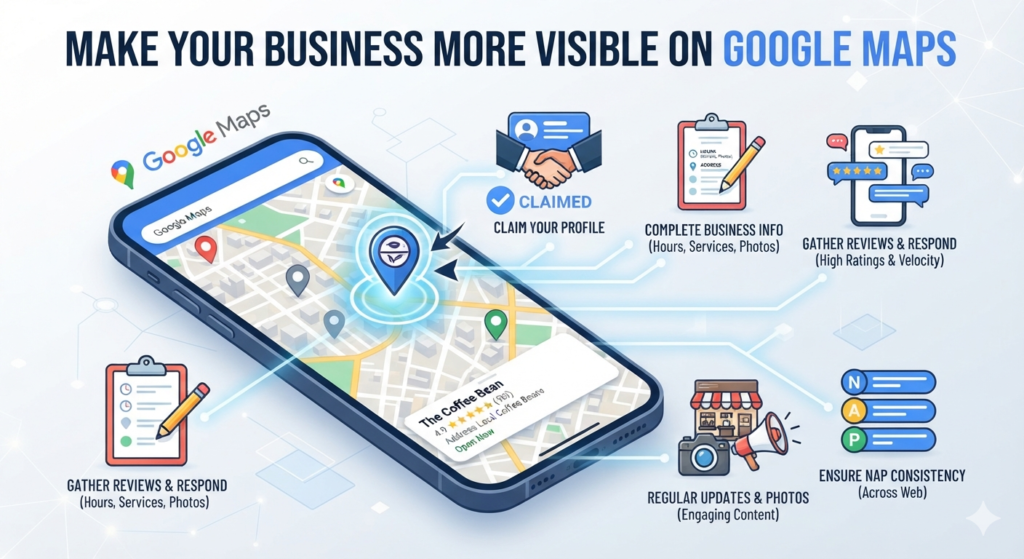
Google Maps visibility is about how easy it’s for customers to find your business when they search for things in an area. For example imagine someone searches for “marketing agency near me” or “best digital marketing agency in Thrissur.” Google may show a map with businesses, including their names, ratings, locations, services, photos and other information. This part of the search results is often called the map pack. Your goal should not just be to have a Google Business Profile. Your goal should be to make that Google Business Profile accurate, trustworthy, relevant and useful so you can compete for Google Maps visibility.
Create and Verify Your Google Business Profile
The first and most important step is to create a Google Business Profile for your business. Your Google Business Profile is like your business card on Google Search and Google Maps. It can show information such as your business name, address, phone number, website, business category, opening hours, photos, services, products, customer reviews and questions and answers. After creating the Google Business Profile make sure you complete Googles verification process. If your Google Business Profile is incomplete it can be harder for customers to trust your business information. Once verified check the Google Business Profile to ensure that all information remains accurate.
Choose the Right Primary Business Category
Your business category tells Google what your business mainly does. This is important for search because Google uses business categories to understand which searches are relevant to your business. For example if you run a travel agency your primary category should accurately represent your business activity, not a service. Choose the category thats available. You can also add categories when appropriate. However do not select categories just because you think they might help you appear in searches. Your categories should accurately describe the services your Google Business Profile provides.
Keep Your Business Information Consistent
Consistency is very important for search. Your business name, address, phone number, website and other important information should be accurate and consistent across your presence. This includes your Google Business Profile, website, social media profiles, local directories, business listings and industry directories. For example if your business is listed as “ABC Digital Marketing” on Google. Appears as “ABC Digital Marketing Agency Kerala” on directories it can create confusion. Use your business name without adding keywords to the name field. The same principle applies to your address and contact information. The Future of On Page SEO and AI Optimization
Write a Useful Business Description
Your Google Business Profile description gives customers information about your business. When writing a description explain what your business does, who you serve, your services, the areas you serve and what makes your business different. For example a digital marketing agency could explain that it provides SEO, social media marketing Google Ads, website development and local SEO services for businesses. Write naturally for customers without filling the description with repeated keywords. Your description should answer one question: “Why should a customer choose your Google Business Profile?”
Add Your Products and Services
If your business offers services add them to your Google Business Profile where the available profile features support them. For example a digital marketing agency could list Search Engine Optimization, Local SEO, Google Ads, Social Media Marketing, Website Development and Content Marketing. A travel agency could list Domestic Tour Packages, International Tour Packages, Flight Booking, Hotel Booking, Visa Assistance and Honeymoon Packages. Adding services helps customers understand what you offer and gives Google context about your Google Business Profile. Avoid adding services that you do not actually provide to target searches.
Upload High-Quality Photos
Photos can make your Google Business Profile more attractive and trustworthy. Customers often want to see what a business looks like before contacting or visiting it. Depending on your business type consider uploading photos of your interior, team, products, services, office, completed projects, events and behind-the-scenes moments. For example an interior design company can showcase completed projects while a restaurant can showcase its dishes and dining environment. Make sure the photos are real, clear, relevant and professionally presented. Do not rely entirely on stock images. Real business photos can help potential customers understand what they can actually expect from your Google Business Profile.
Encourage Genuine Customer Reviews
Make Your Business More Visible on Google Maps by encouraging customers to leave feedback about their experience with your products or services. When people search for businesses on Google Maps they often rely on customer reviews to decide where to go. That’s why it’s crucial to make Your Business More Visible on Google Maps through reviews. Real customer reviews help build credibility and give clients a picture of what to expect from your business.
You can boost visibility by asking customers to share their thoughts after they’ve used your service or bought something from you. Make Your Business More Visible on Google Maps by including a review link in your email receipts text messages or social media posts. This way it’s easy for customers to leave feedback without any hassle.
It’s also important to respond to every review—both with professionalism and care. When you answer comments it shows that your business listens and cares about customer opinions. Make Your Business More Visible on Google Maps by collecting reviews and using them as a tool to improve your offerings.
Avoid reviews or any kind of manipulation because violating Google’s policies can lead to penalties or even removal from Google Maps listings. Instead focus on delivering service so that your customers naturally want to leave feedback. The real, detailed and consistent reviews you have the stronger your presence becomes on Google Maps.
Make Your Business More Visible on Google Maps by turning every interaction into an opportunity to grow trust and attract customers. Let your reputation shine through experiences shared by people who have truly used your business. Make Your Business More Visible, on Google Maps not to reach people but to connect with them meaningfully.